From what I know, you can’t tweak the graphics on PS5, like shadows, effects quality etc.
The only thing you can tweak is gamma which only helps you at night mode (looks like evening when you set it to max, you know this) but that still doesn’t change how the cloak looks like.
Did you change some visual settings on your monitor/tv to see if it makes a difference?
I’ll tell you what I know, since I had two different monitors at the same time, both of them being on a high end of things.
If you have an e-sports monitor which is factory calibrated, meaning that colors are 100% accurate, sRGB accuracy being at 100%, you can see the outline of the cloak a tiny bit better compared to a monitor that isn’t a 100% color accurate.
If you go into settings to change, gamma, coldness/warmth of the colors or worse, messing with the sRGB spectrum, you can end up with the color profile where you can’t see the cloak at all unless the Pred is like 5-10 meters away from you.
So for example, my 400$ monitor didn’t had 100% accurate colors and the cloak was harder for me to see no matter what changes I made in the game and on the monitor itself. When the panel is limited when it comes to color accuracy, you can’t “make” it better. It’s a hardware limitation.
My other, 900$ e-sports monitor is a different story, which I wrote about it, above. There’s no need to tweak anything on him cause the panel was tweaked to perfection by the factory.
You even get the calibration certificate from the factory itself.
But keep in mind that most people, especially here, don’t have monitors like that.
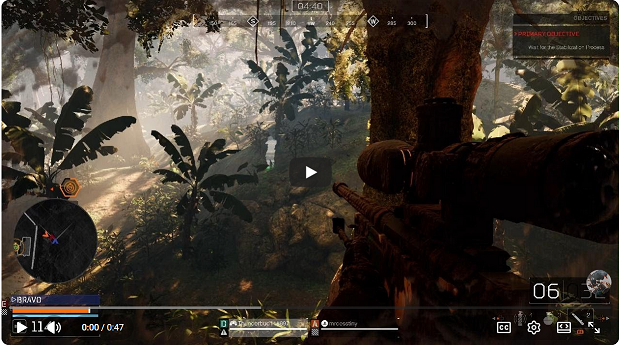
I had a little “test” where my friends on their monitors couldn’t see the cloak outline but I could, because of what I wrote above. I’ll post the video in a minute, I’m on my phone rn.
Here’s the video.
Both of my friends that were in that match with me, when I shared this video with them, they couldn’t see the outlines of the cloak at all.