


https://www.youtube.com/watch?v=tz9AzQWUkZs
Changing vision causes fps to drop. Sometimes the fps will stay low at around 5-10 for up to 20-30 seconds. And of course comes back each time. Especially bad on Epic Games version, seems to be more rare on steam version.
8 FPS bug video and the cause. As if playing predator wasn't hard enough.
Well get right on that for you
Omg thank you so much! You guys are always on top of things fixing serious bugs in a swift manner. Triple A devs need to take a note from you!
Post your PC specs.
I never had this, not even on my laptop.
Sure. But we both know it’s not the PC being weak xD
6800H, 3060 6GB, 32GB 4800MHZ RAM, SSD
Fireteam gameplay usually at 100-150 fps, even predator gameplay is at 90-150fps until this bug kicks in. One thing to clarify, it is not as frequent on steam version, but happens every single time on Epic version, literally every single match. Craftsman has told me it’s due to game VRAM usage skyrocket when you change to heat vision and back, only happens on dx12 according to him. Again, only happens as predator and sometimes can last for a long time, forcing me to reset and wait out the lag. Also heard the same from other players, changing vision tanks their fps like crazy, but since they have a newer GPU, it goes back to normal quicker.
A freaking Unreal engine 5 Arc raiders gives me 100+ fps on all high settings with quality DLSS with it’s giant maps and insane amount of enemies both players and AI.
1 Like
Well the reason I asked for specs is because we all have different hardware when it comes to PC.
Also it helps if you post your in-game settings.
PHG is very unoptimized game, especially if you bump up certain settings.
VRAM going up when you change your vision makes no sense. VRAM primarily fills up when you bump up the textures and when you’re using DLSS or FSR. It doesn’t really effect VRAM to that point when you have “flares” popping on your screen (game effects).
If you have AMD’s Zen 3+ 6800H CPU, it means you’re playing on a laptop and even that 3060 is nerfed compared to the desktop version.
Most laptops are power limited, meaning when you reach that power limit (during gaming), either CPU or GPU will lower it’s frequency 'cause it’s power deficient. This results in loss of FPS.
It is true that changing to heat vision, it does drop frames for a bit, but in my case it’s only a few fps difference, but then again, I have,
R7 5700X3D
RTX 3070
16GB
990 Pro 1TB M.2 SSD
And I also used to play on DX12.
But I have a water-cooled desktop and X3D CPU’s make a huge difference when it comes to games.
This game doesn’t really utilize your GPU to the fullest, at least not mine, my GPU usage hovers around 50-60% with mixed high settings on 1080p resolution. So you could have a RTX 5080 and the game is still gonna run like trash.
But, put X3D CPU like I did, and those frames, especially 1% lows are gonna be much higher.
In 2020, I bought 5600X, the fastest 6c 12t CPU on the planet along with 3060 Ti, I used to have over 300 FPS in PHG, but the FPS drops were horrible. I could go from 360 frames to 170 just by walking towards the base on Excavation map.
Certain spots on HQ would drop my frames to 80 FPS and those 80 FPS felt like 20 FPS.
But when I changed to X3D CPU, my 1% frames went up to 30-40 fps and my FPS was far more stable than with 5600X
So if you indeed have a laptop, post the exact model that you have, so I could check the specs in detail. Also post your in-game settings.
Also in MSI afterburner you can also monitor CPU/GPU power draw/usage and VRAM usage.
Next time when you record, make sure you have those enabled. For me, since they updated to a newer version of Unreal Engine, I stopped using MSI afterburner cause it would make my game crash (Steam version).
Also, Steam version of the game and Epic are not the same. Epic version is the worst between the two.
1 Like
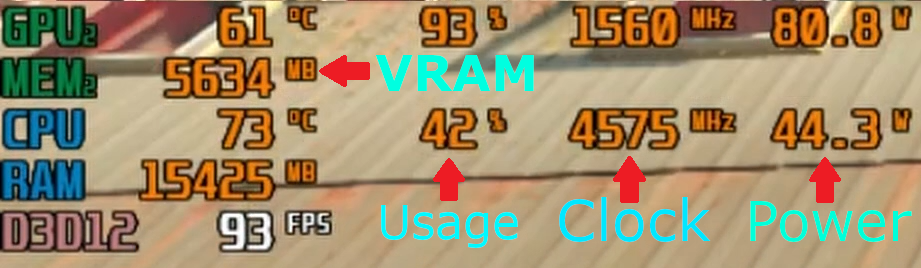
Don’t bother. I am here to share the bug with illfonic so they fix/optimize it. I know full well that getting a better PC is how you “fix it”. My specs are well above their advertised recommended system requirements.
P.S I am not the only who encounters these problems.
1 Like
My point wasn’t “get a better PC”. Because the game runs like trash regardless of your PC specs.
The reason why I asked for in-game settings and specific model of your laptop is that so I could help you find the problem and hopefully solve it.
I had an Alienware laptop with worse specs than yours and I never had that 8 fps bug.
All I tried to do is help you. That’s all.
1 Like
I should record a similar video too!
1 Like
Appreciate it dude, but I made peace with not being able to play the game well. Just sharing it so the devs know it’s a thing.
1 Like
Fuck you
Buy DLC
Imagine if buying DLC increased your FPS lmao
1 Like